

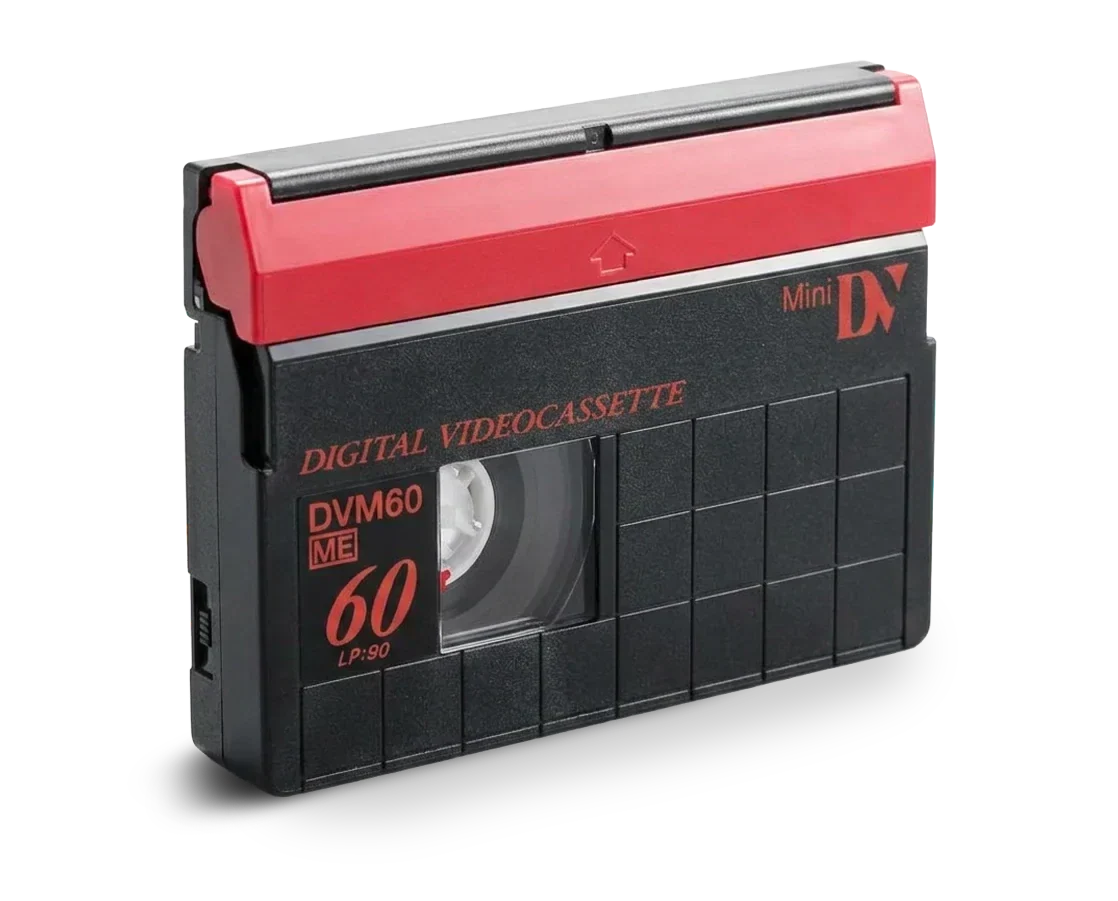
Product Description
MiniDV and DV Tape Transfer to Digital
Preserve home movies, family events and personal recordings with the MiniDV and DV Tape Transfer to Digital service from Precision Transfers. We convert MiniDV and full-size DV tapes into MP4 digital files that are easier to view, copy, store and share on modern devices.
MiniDV and DV record video digitally on magnetic tape. These formats became popular with consumers, videographers and production companies during the 1990s and 2000s. Although the recording is digital, accessing it still requires compatible tape equipment that is becoming increasingly difficult to find and maintain.
Converting MiniDV and DV tapes into digital files helps protect your footage from physical tape deterioration and equipment obsolescence.
Tape Materials and Construction
MiniDV and DV cassettes contain 6.35 mm, or ¼-inch, magnetic videotape housed inside a protective plastic shell.
The tape normally has a thin polyester base with a metal-evaporated magnetic recording layer. Some professional tapes also have an additional protective coating designed to reduce shedding, errors and signal dropouts.
A typical cassette contains:
-
Two internal tape reels
-
6.35 mm magnetic recording tape
-
A rigid plastic outer shell
-
A sliding protective tape cover
-
Internal tape guides
-
A record-protection switch
-
A label showing the tape capacity
-
Optional cassette memory on certain models
The cassette shell protects the tape during normal use, but age, heat, moisture, dust, mould and mechanical damage can still affect playback.
Supported Cassette Sizes and Dimensions
This service supports the two primary DV cassette sizes:
-
MiniDV cassette: approximately 66 × 48 × 12.2 mm
-
Full-size DV cassette: approximately 125 × 78 × 14.6 mm
MiniDV cassettes were widely used in consumer and professional camcorders. Full-size DV cassettes were more commonly used in professional recording decks and long-form production environments.
DVCAM and DVCPRO are related professional formats, but they can require different playback equipment. Precision Transfers offers a separate transfer service for those tapes.
Recording Length and Capacity
Common MiniDV recording capacities include:
-
30 minutes in standard-play mode
-
60 or 63 minutes in standard-play mode
-
80 minutes in standard-play mode
-
Up to 90 or 120 minutes on certain tapes recorded in long-play mode
Full-size DV cassettes can hold substantially longer recordings, with some models providing up to approximately 270 or 276 minutes.
Actual playing time depends on the cassette, recording mode and equipment used. A tape recorded in long-play mode may require additional compatibility testing because some recordings play most reliably in the original camcorder.
Professional Transfer Process
Each tape is inspected before playback and transferred using compatible digital video equipment. The video and audio are captured and converted into an MP4 file suitable for use on current computers, tablets, smartphones and smart TVs.
Since MiniDV already contains digitally recorded video and audio, using compatible playback equipment is important for accurately recovering the original content.
Some MiniDV cassettes may contain HDV recordings instead of standard-definition DV. Please tell Precision Transfers if you know that your tape was recorded in HDV.
Features
-
Professional MiniDV and DV playback equipment
-
Support for MiniDV and full-size DV cassettes
-
Capture of the recorded video and audio
-
MP4 digital-file delivery
-
Files suitable for viewing, storage and sharing
-
Digital files that can be imported into editing software
-
Optional HD upscaling for standard-definition recordings
-
Careful handling of aging magnetic tape
-
In-house processing at our Canadian facility
-
Quality-control review of the completed transfer
The quality of the finished digital file depends on the condition and original recording quality of the tape. Signal dropouts, blocky images, damaged audio, timecode interruptions or other problems already recorded on the cassette may remain in the digital file.
Common Uses
-
Preserving family home movies
-
Digitizing weddings, birthdays and vacations
-
Converting school and sporting-event recordings
-
Recovering interviews and documentary footage
-
Preserving independent films and student productions
-
Converting corporate and training videos
-
Preparing older footage for modern editing software
-
Sharing recordings with family and friends
-
Creating a digital archive of MiniDV tapes
What Is Included
-
Professional transfer of one MiniDV or DV cassette
-
Inspection and careful handling of the submitted tape
-
Capture of the recorded video and audio
-
Conversion into an MP4 digital file
-
Quality-control review
-
Digital delivery through a downloadable link
-
Six months of local backup storage
Please contact Precision Transfers before ordering if you require a specialized file format, native DV capture, HDV transfer, separate audio channels, timecode preservation or another production-specific deliverable.
Care and Preparation
Keep each tape inside its protective case and store it upright in a clean, dry and temperature-controlled environment. Protect the cassette from direct sunlight, excessive heat, high humidity, dust, smoke and strong magnetic fields.
Do not touch the exposed magnetic tape or open the cassette shell. Do not attempt to repair a broken tape with household adhesive. Avoid playing an old or damaged cassette in unverified equipment because the tape could become tangled or damaged.
Clearly label each cassette with its title, recording date or reference number. If known, indicate whether the recording is standard DV, long-play DV or HDV. Include information about the original camcorder or television standard when available.
Contact Precision Transfers before shipping a cassette with visible mould, water damage, loose tape, a cracked shell or other physical damage.
After receiving your converted files, save backup copies in at least two locations, such as an external drive and secure cloud storage.
For more information about placing an order and sending your tapes, visit our How It Works page.
Mini DV / DV Tape Transfer To Digital
We Recommend
Pairs well with
Free Return Shipping On All Orders Over $150 Anywhere in Canada
Secure Cloud Download
High-Quality Digitization
30+ Years Experience
6 Months of Free Cloud Storage
Product Description
MiniDV and DV Tape Transfer to Digital
Preserve home movies, family events and personal recordings with the MiniDV and DV Tape Transfer to Digital service from Precision Transfers. We convert MiniDV and full-size DV tapes into MP4 digital files that are easier to view, copy, store and share on modern devices.
MiniDV and DV record video digitally on magnetic tape. These formats became popular with consumers, videographers and production companies during the 1990s and 2000s. Although the recording is digital, accessing it still requires compatible tape equipment that is becoming increasingly difficult to find and maintain.
Converting MiniDV and DV tapes into digital files helps protect your footage from physical tape deterioration and equipment obsolescence.
Tape Materials and Construction
MiniDV and DV cassettes contain 6.35 mm, or ¼-inch, magnetic videotape housed inside a protective plastic shell.
The tape normally has a thin polyester base with a metal-evaporated magnetic recording layer. Some professional tapes also have an additional protective coating designed to reduce shedding, errors and signal dropouts.
A typical cassette contains:
-
Two internal tape reels
-
6.35 mm magnetic recording tape
-
A rigid plastic outer shell
-
A sliding protective tape cover
-
Internal tape guides
-
A record-protection switch
-
A label showing the tape capacity
-
Optional cassette memory on certain models
The cassette shell protects the tape during normal use, but age, heat, moisture, dust, mould and mechanical damage can still affect playback.
Supported Cassette Sizes and Dimensions
This service supports the two primary DV cassette sizes:
-
MiniDV cassette: approximately 66 × 48 × 12.2 mm
-
Full-size DV cassette: approximately 125 × 78 × 14.6 mm
MiniDV cassettes were widely used in consumer and professional camcorders. Full-size DV cassettes were more commonly used in professional recording decks and long-form production environments.
DVCAM and DVCPRO are related professional formats, but they can require different playback equipment. Precision Transfers offers a separate transfer service for those tapes.
Recording Length and Capacity
Common MiniDV recording capacities include:
-
30 minutes in standard-play mode
-
60 or 63 minutes in standard-play mode
-
80 minutes in standard-play mode
-
Up to 90 or 120 minutes on certain tapes recorded in long-play mode
Full-size DV cassettes can hold substantially longer recordings, with some models providing up to approximately 270 or 276 minutes.
Actual playing time depends on the cassette, recording mode and equipment used. A tape recorded in long-play mode may require additional compatibility testing because some recordings play most reliably in the original camcorder.
Professional Transfer Process
Each tape is inspected before playback and transferred using compatible digital video equipment. The video and audio are captured and converted into an MP4 file suitable for use on current computers, tablets, smartphones and smart TVs.
Since MiniDV already contains digitally recorded video and audio, using compatible playback equipment is important for accurately recovering the original content.
Some MiniDV cassettes may contain HDV recordings instead of standard-definition DV. Please tell Precision Transfers if you know that your tape was recorded in HDV.
Features
-
Professional MiniDV and DV playback equipment
-
Support for MiniDV and full-size DV cassettes
-
Capture of the recorded video and audio
-
MP4 digital-file delivery
-
Files suitable for viewing, storage and sharing
-
Digital files that can be imported into editing software
-
Optional HD upscaling for standard-definition recordings
-
Careful handling of aging magnetic tape
-
In-house processing at our Canadian facility
-
Quality-control review of the completed transfer
The quality of the finished digital file depends on the condition and original recording quality of the tape. Signal dropouts, blocky images, damaged audio, timecode interruptions or other problems already recorded on the cassette may remain in the digital file.
Common Uses
-
Preserving family home movies
-
Digitizing weddings, birthdays and vacations
-
Converting school and sporting-event recordings
-
Recovering interviews and documentary footage
-
Preserving independent films and student productions
-
Converting corporate and training videos
-
Preparing older footage for modern editing software
-
Sharing recordings with family and friends
-
Creating a digital archive of MiniDV tapes
What Is Included
-
Professional transfer of one MiniDV or DV cassette
-
Inspection and careful handling of the submitted tape
-
Capture of the recorded video and audio
-
Conversion into an MP4 digital file
-
Quality-control review
-
Digital delivery through a downloadable link
-
Six months of local backup storage
Please contact Precision Transfers before ordering if you require a specialized file format, native DV capture, HDV transfer, separate audio channels, timecode preservation or another production-specific deliverable.
Care and Preparation
Keep each tape inside its protective case and store it upright in a clean, dry and temperature-controlled environment. Protect the cassette from direct sunlight, excessive heat, high humidity, dust, smoke and strong magnetic fields.
Do not touch the exposed magnetic tape or open the cassette shell. Do not attempt to repair a broken tape with household adhesive. Avoid playing an old or damaged cassette in unverified equipment because the tape could become tangled or damaged.
Clearly label each cassette with its title, recording date or reference number. If known, indicate whether the recording is standard DV, long-play DV or HDV. Include information about the original camcorder or television standard when available.
Contact Precision Transfers before shipping a cassette with visible mould, water damage, loose tape, a cracked shell or other physical damage.
After receiving your converted files, save backup copies in at least two locations, such as an external drive and secure cloud storage.
For more information about placing an order and sending your tapes, visit our How It Works page.
Mini DV / DV Tape Transfer To Digital
If you have any questions, you are always welcome to contact us. We'll get back to you as soon as possible, within 24 hours on weekdays.
-
Shipping Information
Use this text to answer questions in as much detail as possible for your customers.
-
Customer Support
Use this text to answer questions in as much detail as possible for your customers.
-
FAQ’s
Use this text to answer questions in as much detail as possible for your customers.
-
Contact Us
Use this text to answer questions in as much detail as possible for your customers.
Common Questions
Please read our FAQs page to find out more.
Do I need to make an appointment if I am dropping off my media?
Use this text to answer questions in as much detail as possible for your customers.
How long will my order take?
Use this text to answer questions in as much detail as possible for your customers.
Why should I upconvert my media to HD?
Use this text to answer questions in as much detail as possible for your customers.
It's easy as 1, 2, 3.
How it Works
The process is easy, simply create your order, send in your media and we'll digitize your memories.

Place an Online Order
Place your order after selecting the media type and quantity, adding it to cart, and then creating an account.
Send in Your Media
The cost of shipping to Precision Transfers is not included in the rate and is handled by Canada Post or your local courier. The return shipment fee is available when placing your order if you wish to return tapes or films. Free return shipping is also available for orders over $150. The customer may choose to recycle the originals rather than return it upon completion.

View & Save Your Media
The transferred files are sent via a Google Drive link where you can download them. You can then save the file to your local drive or your USB drive. Due to the fact that this format is no longer supported by the industry, we do not support transfers to DVD. High-quality MP4 files are the standard transfer format, and we also store a backup locally for six months. Please let us know if you have a specific format request.